How to Install Jailbreak Without Computer
Pwn20wnd released the new unc0ver jailbreak version for the jailbreak community, iOS 14 – iOS 14.3 jailbreak with unc0ver with Cydia support for all devices. The supported devices for iOS 14.3 unc0ver jailbreak are mentioned below as well in case you want to check, although its for all the devices.
The step-by-step methods are described below for downloading unc0ver jailbreak iOS 14 with a Computer using AltStore and download unc0ver no PC. Do not ignore the important notes mentioned in this guide before digging into jailbreak iOS 14.3 .
The processes to download unc0ver jailbreak, whether it's for iOS 11, iOS 12, iOS 13, iOS 14, and iOS 14.3, the process remains the same to jailbreak your device. But if you got a device with an iOS version higher than iOS 14.3, you need to jailbreak using checkra1n jailbreak.
What's Covered Below?
- What's New in Unc0ver Jailbreak Version?
- What a Jailbreak Is?
- Why People Prefer Unc0ver Jailbreak Over Others?
- Unc0ver Jailbreak supported devices iOS 14 – iOS 14.3
- How To Install Unc0ver Jailbreak iOS 14 – iOS 14.3
-
- Very Note after Downloading unc0ver jailbreak iOS 14.3
- Before you install tweaks to make sure that those tweaks are updated to work with iOS 14.3 jailbreak. Because those may cause issues if you install old tweaks. How do you do that? that is mentioned below as well as how to check tweaks compatibility for unc0ver jailbreak.
- Warning Before You Download Unc0ver Jailbreak iOS 14.3
-
- How To Download Unc0ver Jailbreak iOS 14 – 14.3 with AltStore [Computer Method]
- Step #1
- Step #2
- Step #3 – (Two ways to Sideload unc0ver app with Altstore)
- [Video] How to install unc0ver jailbreak iOS 14.3 on iPhone using Altstore
- How To Download Unc0ver Jailbreak NO PC iOS 14.3 – iOS 14 [Unc0ver No Computer]
- Step #1
- Step #2
- Step #3
- Step #4
- Conclusion
- [Video] iOS 14 Unc0ver Jailbreak Download NO PC
- Unc0ver Jailbreak iOS 14 FAQs
- What does unc0ver jailbreak do?
- Is unc0ver jailbreak safe?
- How do I download unc0vered jailbreak?
- Is unc0ver untethered?
- Can you unc0ver jailbreak without a computer?
What's New in Unc0ver Jailbreak Version?
The main highlight of the unc0ver jailbreak new version is, it supports all the devices, including A14, and of course on all the older devices as well.
unc0ver v6.0.0 is NOW OUT.
What a Jailbreak Is?
iOS jailbreaking is a privilege escalation to remove software restrictions imposed by Apple oniOS,tvOS, andwatchOS. This is done through a series of kernel patches. This jailbreaking allows root access to iOS, allowing the downloading and installing of additional applications and extensions which are unavailable through the official Apple App Store. You can download unc0ver jailbreak with computer or download unc0ver jailbreak no pc by our detailed methods below.
Also, check to fix unc0ver jailbreak Cydia issues and Fix Unc0ver App Revoke Problem.
Why People Prefer Unc0ver Jailbreak Over Others?
The unc0ver jailbreak iOS 14 is semi-untethered; this is the main reason why people choose unc0ver over other jailbreaks like checkra1n jailbreak or taurine jailbreak. Unc0ver jailbreak is a semi-untethered jailbreak means that you don't need a computer to re-jailbreak your device after your phone is rebooted as long as you have an unc0ver jailbreak app on your device. After a reboot, open the app and press the jailbreak button.
Also, keep in mind that it doesn't mean you can't install the application through a computer on your device; you can do that as well. Below both of the methods of installing unc0ver no PC and installing unc0ver with computer is explained step by step to install unc0ver jailbreak iOS 14 .
Also, check the massive list for unc0ver jailbreak tweaks and an enormous list for Sileo tweaks for Chimera jailbreak.
Important Note: (If you face any errors or unc0ver jailbreak doesn't work correctly. It must be because of the already downloaded iOS update (only downloaded update staying) in your device's settings. This is a common problem with jailbreak utilities if you have pending downloaded iOS updates and are not installed. Just delete that downloaded file and try again. This will work fine.)
If you got a passcode disabled iPhone, here is a brand new method to unlock forgot iPhone passcode on a disabled device for free, thanks to checkra1n jailbreak.
Unc0ver Jailbreak supported devices iOS 14 – iOS 14.3
- iPhone 12, iPhone 12 Pro, iPhone 12 Pro Max
- iPhone 11, iPhone 11 Pro, iPhone 11 Pro Max
- iPhone X, iPhone XS Max, iPhone XR
- iPhone 8, iPhone 8 Plus
- iPhone 7, iPhone 7 Plus
- iPhone 6s, iPhone 6s Plus
- iPhone 6, iPhone 6 Plus
- iPhone SE
- iPhone 5s
- iPad Mini (5th generation)
- iPad Air (2019, 3rd generation)
- iPad mini 4, iPad mini 3, iPad mini 2
- iPod touch 6G
- 2nd-gen 12.9-inch iPad Pro, 12.9-inch iPad Pro, 1st-gen 10.5-inch iPad Pro
- 9.7-inch iPad Pro
- iPad Air 2, iPad Air
If you want, you can Jailbreak tvOS with blackb0x jailbreak and enjoy Kodi of Apple Tv.
How To Install Unc0ver Jailbreak iOS 14 – iOS 14.3
This is our first method to download unc0ver jailbreak iOS 14 with a computer; another one to download unc0ver no pc is below this.
Very Note after Downloading unc0ver jailbreak iOS 14.3
Before you install tweaks to make sure that those tweaks are updated to work with iOS 14.3 jailbreak . Because those may cause issues if you install old tweaks. How do you do that? that is mentioned below as well as how to check tweaks compatibility for unc0ver jailbreak.
Warning Before You Download Unc0ver Jailbreak iOS 14.3
Make you do not have any downloaded OTA updates on your device. If you do, go to Settings-> iPhone Storage, here you'll find any downloaded OTA updates and delete them, because it may create problems. Delete them before you attempt
iOS 14 jailbreak. Moreover, the RootlessJB (Jailbreak), which was released previously for developers only, be sure to remove that as well from your device completely. For that, a section in this article (Switch checkra1n and Unc0ver Jailbreak) will guide you on how to remove all the jailbroken files from your device to install a fresh jailbreak.
How To Download Unc0ver Jailbreak iOS 14 – 14.3 w ith AltStore [Computer Method]
Here is the first method of downloading unc0ver jailbreak with Altstore. In this computer method, we'll be using AltStore for unc0ver jailbreak download. Another method to download unc0ver no computer is below.
The reason we're using it is, you don't have to resign the unc0ver jailbreak manually every seven days. It'll resign the application after every seven days automatically if you keep the Altserver open on your computer and both your device and computer are connected to the same WiFi network and the device is connected to your computer.
You can get install altstore for unc0ver from our separate two guides, here are altstore windows, and here is altstore mac tutorial. Please follow the installation process according to the system you have.
Check here unc0ver untethered jailbreak iOS 14.4 – iOS 14.5.1 as it's released now.
Step #1
Install the AltStore through Altserver on our device.
Installing Altstore with Altserver is a separate full-fledged topic depending on you are installing it through a Windows computer or a Mac computer. Mentioning that whole process here would make this article too long. So before you follow step 2 below, go here follow our step-by-step guide to install Altstore on iPhone on your device through a MAC or a Windows computer, both methods are described in detail there, and come back here, follow the below step 2.
Step #2
Now when the AltStore server is set up, we'll download unc0ver jailbreak iOS 14.3 on the device.
Keep in mind, your computer and device must be on the same WiFi network, and the AltServer must be running on your computer and your device must be connected to your PC as well. Because it's your computer that will sign the application.
Here is the separate tutorial to save shsh2 blobs without pc.
After AltStore installation, trust it through settings so you can open it. Now open the unc0ver.dev website and download the unc0ver jailbreak iOS 14 IPA file through a big blue button.
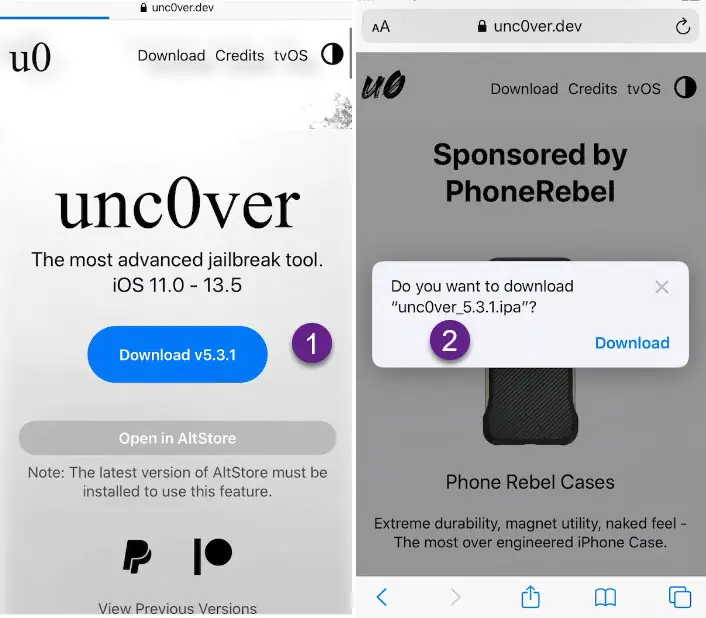
Unc0ver vs Checkra1n vs Odyssey jailbreak, which one is better for your device?
Step #3 – (Two ways to Sideload unc0ver app with Altstore)
1st Way– Open the Altstore after Unc0ver jailbreak IPA downloaded.
Go to the settings tab from the bottom options and sign in with the same Apple ID you signed in while installing the Altstore.
After you are signed in, tap on the My Apps from the bottom, then tap on the + sign at the top left corner. Tap on the unc0ver version file there; it will go through the steps that will get this file signed and install on your device. After it's completed, you will see the unc0ver jailbreak file in the My Apps section in AltStore.
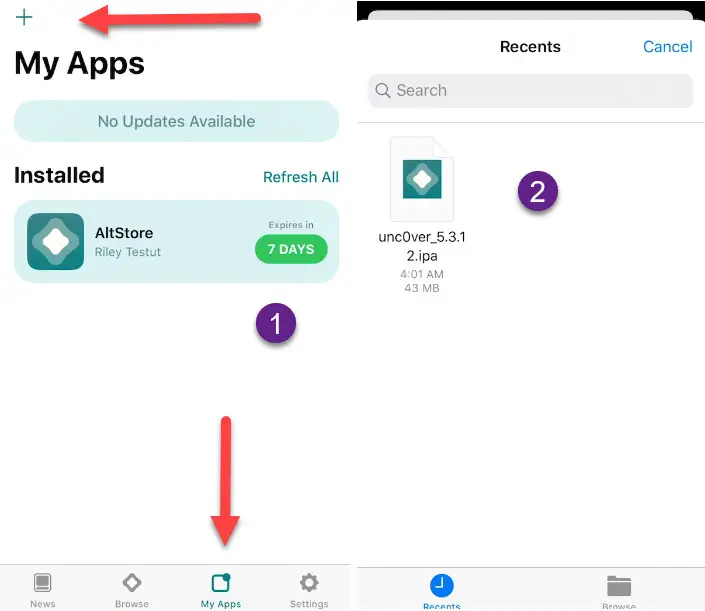
The application must be on your home screen, installing unc0ver with Altstore is the preferable method to get it as compared to unc0ver no computer method. open the unc0ver jailbreak app, and press the jailbreak button to jailbreak iPhone with unc0ver jailbreak.
Your device will restart after the completion, but the jailbreak might not be done yet. After the device is switched back on, open the unc0ver app again and see if it's still saying jailbreak on the blue button, if yes, press the jailbreak button again.
This time after the reboot, you will find Cydia on your device's home screen that means you are jailbroken with unc0ver jailbreak.
Check checkra1n jailbreak windows checkn1x method here.
2nd Way- When the unc0ver jailbreak IPA file is downloaded, open it and tap on the arrow above. After that, scroll to the right side and press on the More button, there will be an option to copy to AltStore, do it.
If you're curious how you'd install it without a computer, below this method, there is a step by step method to download unc0ver no computer or no pc.
Now, you'll be able to install unc0ver directly through AltStore; a progress rolling bar will be showing at the top of the AltStore screen.
AltStore will resign the unc0ver application automatically every seven days, you need to open the server on the computer and the same WiFi network once a week, and it'll do the rest.
Here is your favorite tutorial to bypass jailbreak detection on jailbroken devices.

The application must be on your home screen, open the unc0ver jailbreak app, and press the jailbreak button. Your device will restart after the completion, but the jailbreak might not be done yet. After the device is switched back on, open the unc0ver app again and see if it's still saying jailbreak on the blue button, if yes, press the jailbreak button again.
Check out Top Most Essential Cydia Tweaks for iOS Unc0ver Jailbreak.
If you are on a newer iOS version that is NOT supported to be jailbroken through unc0ver jailbreak, that is iOS 11 to iOS 14.3. You still can jailbreak your device, if you are on iOS 14.4, you can jailbreak through this guide of checkra1n jailbreak.
[ Video ] How to install unc0ver jailbreak iOS 14.3 on iPhone using Altstore
No here below is the second method to download unc0ver no computer.
Here is how you can speed up the jailbroken iphone device.
How To Download Unc0ver Jailbreak NO PC iOS 14.3 – iOS 14 [Unc0ver No Computer]
Here is the second method to download unc0ver jailbreak for A9 and A14 devices on the iOS 14 – iOS 14.3, here we'll download unc0ver jailbreak no PC method.
Step #1
First, to download unc0ver jailbreak iOS 14 you need to go to the Safari browser and go to this AppValley website.
If you have already opened this AppValley website before on your device, then you need to follow these steps before you try again to use it. Go into your phone's settings -> general -> safari -> clear history and website data. After that, try opening this AppValley website in the browser.
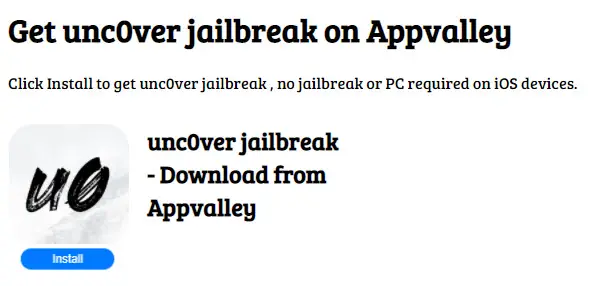
Step #2
On the website, find unc0ver, just tap on the install button.
It will start downloading the unc0ver jailbreak on your home screen. Just wait a few seconds to complete the installation process.
Step #3
Once it's completed, you need to trust this application first before you can use it.
Here is how to backup all tweaks and restore them later.
Step #4
Go to settings -> general ->profile & device management; from there, you can trust the newly installed jailbreak app. After that, you can use it to jailbreak your device.
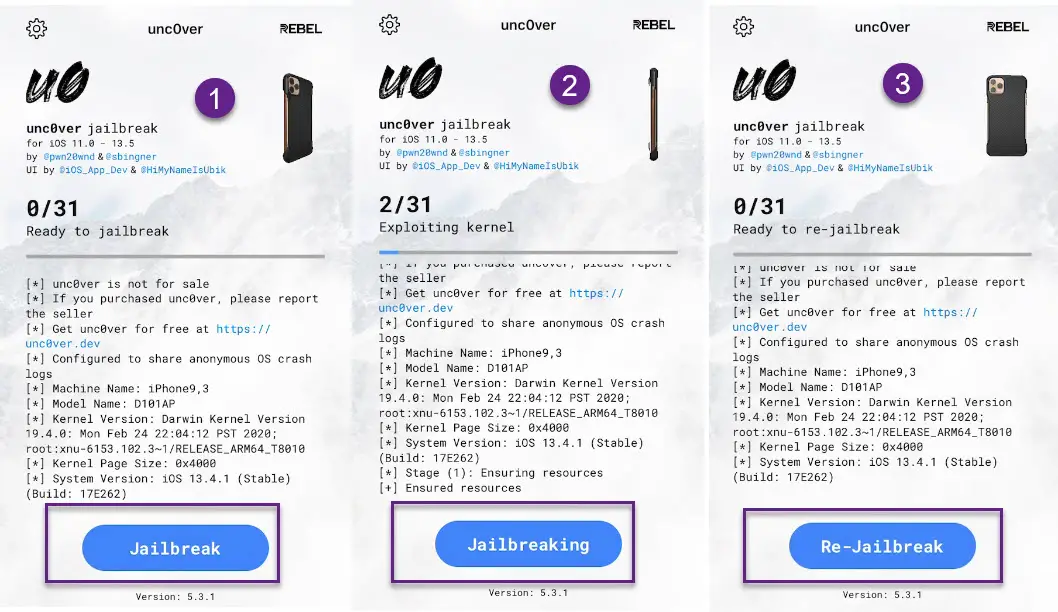
The application must be on your home screen, open the unc0ver no pc jailbreak app, and press the jailbreak button. But still, I recommend installing unc0ver with AltStore as compared to unc0ver no computer because when the signing service gets revoked by Apple, downloaded apps stop working.
Your device will restart after the completion, but the jailbreak might not be done yet. After the device is switched back on, open the unc0ver app again and see if it's still saying jailbreak on the blue button, if yes, press the jailbreak button again.
Follow these Cydia tweaks to improve performance on iOS jailbroken devices.
Conclusion
That's All! If you have download uncover Jailbreak iOS 14.3 , please share your opinion below in the comments section. I have shown both ways to install unc0ver with AltStore and unc0ver no PC.
[Video]iOS 14 Unc0ver Jailbreak Download NO PC
Unc0ver Jailbreak iOS 14 FAQs
What does unc0ver jailbreak do?
Unc0ver jailbreak is a jailbreak utility, it allows you to do whatever you want to do on your iOS firmware device. If you want to unlock the power of your Apple device, unc0ver jailbreak is what allows you to do anything.
Is unc0ver jailbreak safe?
Unc0ver is a semi-untethered jailbreak that is completely safe to use and have on your iDevice. It's completely tested for bugs and malware and its compatible with iOS 11 to iOS 14.3 devices to jailbreak safely.
How do I download unc0vered jailbreak?
If you want to download iOS unc0ver jailbreak, follow the steps mentioned in this article, you won't face any hurdles in downloading and jailbreaking your device with unc0ver.
Is unc0ver untethered?
Yes, not completely, but the unc0ver jailbreak utility is semi-untethered jailbreak which means that whenever you restart your device, you need to re-jailbreak your device again. Because after the restart if you open unc0ver utility, it'll keep on crashing.
Can you unc0ver jailbreak without a computer?
Of course yes, there are two ways to jailbreak your device with unc0ver, one is with computer and other is with mobile. Follow our detailed step by step article to jailbreak your device with unc0ver jailbreak without a computer.
How To Unc0ver Jailbreak Download iOS 14 - 14.3 [PC/ Mobile] 2021
How to download unc0ver jailbreak iOS 14.3 (2021) on ALL devices Windows / Mac 2021 iOS 14.3 unc0ver no pc jailbreak download.
Price: FREE
Operating System: iOS, iPad OS, Windows, MAC
Application Category: Jailbreak
How to Install Jailbreak Without Computer
Source: https://www.techacrobat.com/unc0ver-jailbreak-download/
0 Response to "How to Install Jailbreak Without Computer"
Post a Comment